
In the world of digital marketing, the goalposts have shifted. We are no longer just optimizing for clicks; we are optimizing for answers. This is the era of AEO (Answer Engine Optimization).
HubSpot AEO Grader: The Complete Guide to Ranking Your Website on ChatGPT and Google AI
1. What is AEO and Why is it the New Face of Search?
In the past, when we wanted to learn something, we typed a query into Google and scrolled through a long list of links. Today, we ask AI platforms like ChatGPT, Perplexity, and Gemini. This shift has birthed AEO.
While SEO (Search Engine Optimization) focuses on ranking high in traditional search results, AEO focuses on becoming the direct answer provided by AI to the user.
Why does it matter now?
Zero-Click Searches: More users get their answers directly from the AI overview, meaning they never feel the need to click a website link.
Conversational Tone: People are talking to the internet like they talk to a friend.
Speed and Precision: Users want the “bottom line” immediately without reading a 2,000-word article.
2. Deep Dive: What is the HubSpot AEO Grader?
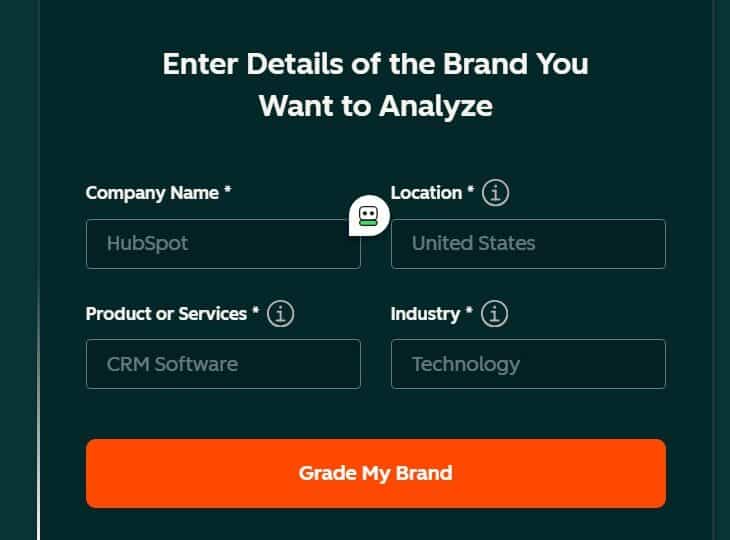
The HubSpot AEO Grader is a tool designed to analyze how “AI-ready” your website is. Think of it as a Salad Quality Inspector. If your website is a delicious Garden Salad, the tool checks if the ingredients are fresh (content), if the arrangement is clean (structure), and if it is easy to consume (accessibility).
How does it evaluate your website?
HubSpot uses data analytics to look at three core pillars:
Readability for AI: Can AI bots actually parse your content? Are you using simple, direct language?
Authority and Trust: Does the internet trust your brand? AI rarely cites sources that lack credibility.
Technical Structure: Is your Schema Markup correct? This acts as the “menu card” of your website for robots.
3. Actionable Insights: How to Use the Report to Rank in AI Chatbots
Once you receive your report from HubSpot, it’s time to take action. Here is how you can get noticed by ChatGPT, Perplexity, and Gemini.
Step 1: Optimize Content (The “Bite-Sized” Method)
AI loves direct answers. Like preparing a Vegetable Wrap, it needs to be compact and easy to digest.
Use H2 and H3 headings formatted as questions (e.g., “What are the best vegetables for iron?”).
Provide the answer in the first two sentences of the paragraph.
Use Bullet Points for lists.
Step 2: Strengthen E-E-A-T
According to the Search Engine Journal, Experience, Expertise, Authoritativeness, and Trustworthiness are critical.
Include a clear Author Bio.
Earn backlinks from respected industry sites.
Ensure all data and facts are updated regularly.
Step 3: Technical AEO Checklist
Ensure the “backend” of your website is polished.
[ ] Implement FAQ Schema.
[ ] Improve Page Load Speed (AI and humans both hate waiting).
[ ] Ensure the site is Mobile-Friendly.
[ ] Use JSON-LD for structured data.
4. The Future of Search
Search is no longer just about finding a link; it’s about finding a solution. In the future, websites that don’t adapt to AEO will be like a restaurant with no signage—no matter how good your Vegetarian Lasagna is, if the AI can’t find you, no one will know you exist.
The HubSpot AEO Grader is more than just a tool; it is your roadmap. With it, you can ensure your brand remains at the center of the AI conversation.
FAQs: AEO GRADER REPORT
1. What is the primary purpose of the AEO Grader?
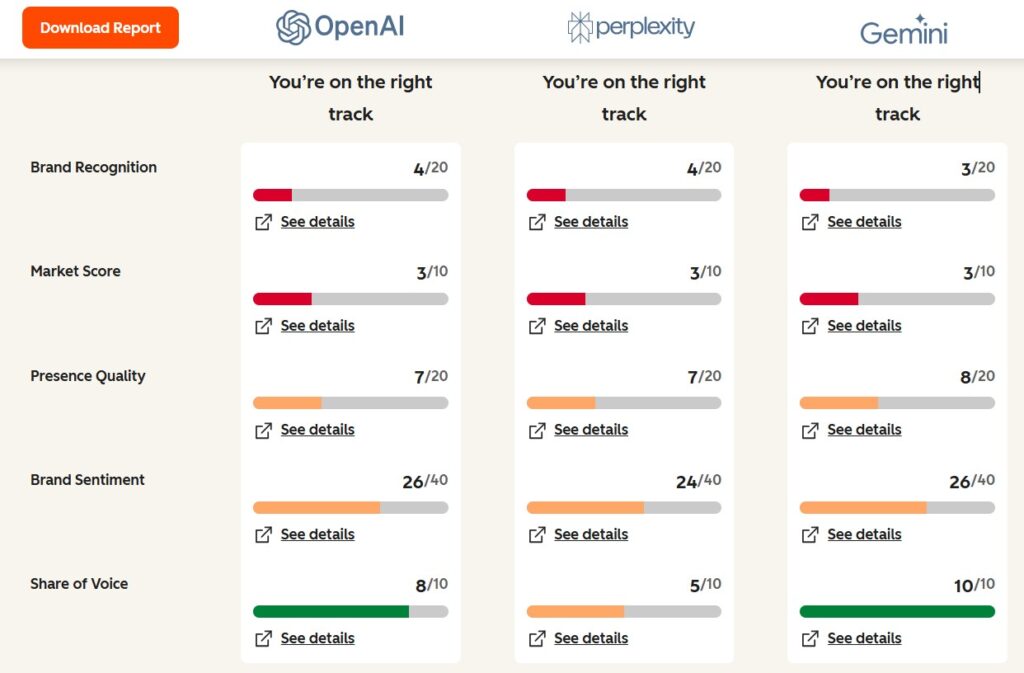
The tool analyzes how AI platforms perceive and describe your brand. It evaluates Share of Voice (how often you are mentioned compared to competitors) and Brand Sentiment (whether those mentions are positive, neutral, or negative).
2. How does the “AEO Score” work?
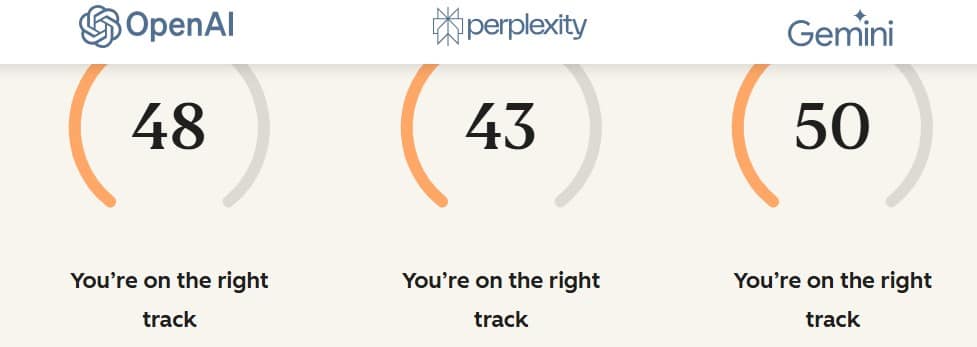
The report provides an aggregate score based on your readiness for answer engines. Scores are often color-coded:
Green: Content is well-structured and highly visible in AI responses.
Yellow: Areas for improvement exist, such as missing schema or moderate visibility.
Red: Content is invisible to AI engines or misrepresented.
3. Is the AEO Grader tool free?
Yes, HubSpot offers a free version of the AI Search Grader that provides baseline visibility and sentiment analysis. Deeper integration with HubSpot Marketing Hub and advanced “AEO Strategy” features are typically part of paid Content Hub or Marketing Hub plans.
4. How often should I run a report?
While you can run the tool unlimited times, HubSpot recommends a quarterly cadence to track progress, as AI models do not update their training data daily.
5. What actionable steps does the report recommend?
Reports commonly prioritize these “quick-win” actions to boost visibility:
Direct Q&A blocks: Adding concise 2-4 sentence answers to common customer questions on your site.
Schema Markup: Implementing FAQ, HowTo, and BlogPosting schema to make pages “machine-readable”.
External Citations: Gaining mentions on high-authority sites like G2 or industry publications, which AI engines use as sources.
6. How does AEO differ from traditional SEO?
Traditional SEO focuses on ranking for clicks on search result pages. AEO focuses on visibility and influence within synthesized AI answers, where a user might never click a link but still forms an impression of your brand.
7. Which AI engines does it track?
The report tracks brand performance across major large language models (LLMs), including ChatGPT, Google Gemini, and Perplexity.
8. What is the difference between AEO and SEO?
SEO (Search Engine Optimization): Aims for high rankings on Search Engine Results Pages (SERPs) to drive clicks and website traffic.
AEO (Answer Engine Optimization): Aims for brand mentions and citations within AI-synthesized answers. It focuses on influencing the AI’s “Share of Voice” and sentiment regarding your brand.
9. Which AI platforms does the Grader analyze? As of early 2026, the tool provides performance data for:
ChatGPT (OpenAI)
Perplexity
Gemini (Google)
10. How is the score calculated? The report provides a performance score (usually 0-100) based on five dimensions:
Brand Visibility: How often you are mentioned across test queries.
Competitive Standing: Your position relative to 2–5 named competitors.
Contextual Relevance: How AI characterizes your brand in different scenarios (e.g., “best for small business”).
Sentiment Analysis: Whether the AI portrays your brand positively, neutrally, or negatively.
Source Authority: The quality of websites the AI cites when talking about you.
11. How much does it cost? The tool is completely free. Unlike some competitor tools (like Otterly.ai) that require monthly subscriptions, HubSpot offers the AEO Grader at no cost with no usage limits.
12. How do I improve my AEO score?
Structure content for AI: Use modular, “answer-first” blocks (40–60 words) that directly answer specific questions.
Implement Schema: Add FAQ, Product, and HowTo schema to help AI crawlers parse your data.
Build Authority: Increase mentions on third-party sites like Reddit, G2, and industry publications, as AI relies on “community consensus.
The HubSpot AEO Grader is an essential tool for the modern digital landscape. As users shift from browsing links to asking AI for direct recommendations, your brand’s “Share of Voice” in these answers becomes critical.
By using this report, you can move beyond traditional keyword tracking and start optimizing for authority, sentiment, and visibility within AI models. Improving your AEO score ensures that when a potential customer asks an AI for a solution, your brand is the one it trusts and recommends.
RELATED POSTS
View all

Ultimate Beginner’s Guide 101: Free Tools for SEO Jobs and Career Growth
June 6, 2023 | by Ian Christian Sardea

Why NDIS Providers Fail to Build Trust and Authority Online (And How to Fix It)
November 13, 2025 | by John Corpuz